ATAS Data Connection: How to Connect the TAI-PAN Data Feed to ATAS
Connecting TAI-PAN to ATAS: Step-by-Step Setup Guide
Are you using the professional trading platform ATAS and need reliable, fast market data? With the TAI-PAN real-time data feeds, you get the highest data quality directly in your ATAS charts. This guide shows you how to set up the connection in just a few clicks.
What is ATAS – and why does it need a data feed?
ATAS (Advanced Trading Analytics Software) is a professional chart and trading platform used primarily by futures traders for order-flow analysis. The platform offers market and volume profiles, DOM heatmaps, footprint charts and detailed bid/ask evaluations.
Important: ATAS does not provide real-time market data itself. The platform depends on external data feed providers that deliver current prices, tick data and order book information in real time.
The official ATAS documentation lists accepted data feed providers in its knowledge base under "Connectors". TAI-PAN by Lenz + Partner is officially listed there – with its own setup guide and demo registration page.
TAI-PAN – officially supported data feed for ATAS
Lenz + Partner and ATAS have an official data feed integration. TAI-PAN is listed in the ATAS Connector knowledge base and can be set up directly within the platform – without any third-party software.
What makes TAI-PAN stand out as an ATAS data feed:
- Officially listed in the ATAS knowledge base under "Connectors"
- Direct connection via Connections → Add → Taipan
- Real-time prices for Eurex futures (DAX, Bund, STOXX)
- CME contracts: E-Mini S&P 500, Nasdaq, commodities, rates
- XETRA stocks, European and US exchanges
- Tick data and market depth (order book / DOM) for order flow
- Tick data since 2002 for backtesting in ATAS
- German-speaking support, provider based in Germany
Setup guide: connecting TAI-PAN to ATAS
The setup is straightforward and can be completed in just a few clicks. Please have your TAI-PAN login credentials ready – customer number / ID and password – which you received from us via email.
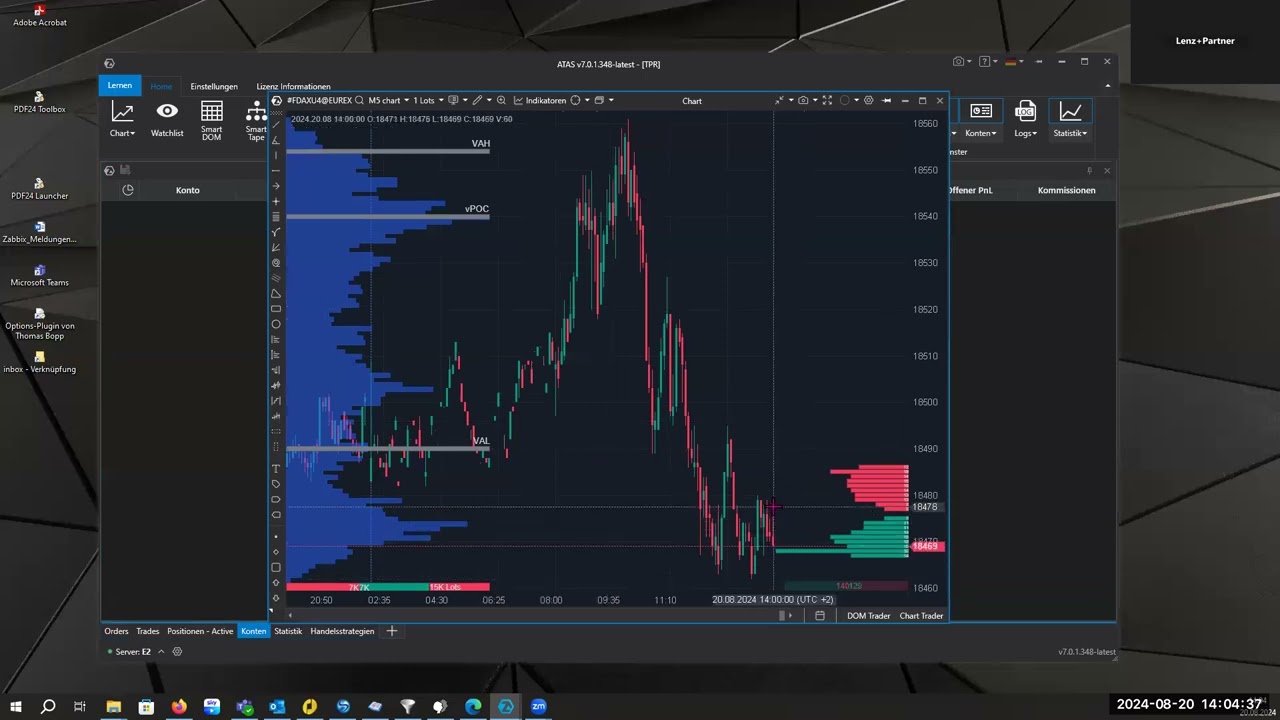
Open the Connections Manager
Start your ATAS software and click on Connections in the main menu.
Tip: If you have old connections that are no longer needed, you can delete them here first for a better overview.
Add TAI-PAN as a data feed
Click the Add button in the connections window. A list of all supported data providers will open. Select Taipan and click Next.
Connections → Add → Taipan → Next Enter your login credentials
Fill in the three fields in the connection form:
- Name: Assign a unique name for the connection (e.g. "Tai-Pan Realtime")
- Customer number / ID: Enter your TAI-PAN ID from our email
- Password: Enter your corresponding password
You can also find your customer number at any time in the TAI-PAN customer portal.
Establish the connection
Click Finish and then click the Connect button. The status will now change to "Connected". You can now close the connections window and directly open your first chart.
Sometimes, after the initial setup, the time in the chart might be shifted (e.g. by 2 hours). Here is how you can fix this time zone error in seconds:
- Go to Settings in ATAS and select Time Zones.
- You can set the time zone either by "Exchange" or by "Symbol".
- Find the corresponding exchange (e.g. Eurex) in the list. If there is a "0" everywhere under the shift column, click directly into the field.
- Select "Local Time Zone" from the drop-down menu.
- The shift (e.g. "2" for two hours) will now be set correctly automatically – your chart will display the exact current trading time again.
help.atas.net → TAI-PAN Connecting · TAI-PAN Demo Registration
Which markets are available?
TAI-PAN supplies ATAS with real-time market data for all major futures markets, European and US stock exchanges and further asset classes:
Futures
- Eurex: DAX futures, Euro Bund Future, STOXX 50, mini futures
- CME Group: E-Mini S&P 500, E-Mini Nasdaq, Euro FX, Crude Oil (WTI)
- CBOT: Wheat, corn, soybeans, US T-bonds
- NYMEX: Crude oil, natural gas, heating oil
- COMEX: Gold, silver, copper
Stocks & indices
- XETRA, Frankfurt, Deutsche Börse
- NYSE, NASDAQ, Euronext, SIX Swiss Exchange
- DAX, MDAX, SDAX, Euro STOXX 50, S&P 500, Dow Jones
Further data types for ATAS
- Tick data (every single price change) for footprint charts and order flow
- Order book / DOM data (market depth) for DOM heatmaps
- Historical tick data since 2002 for backtesting in ATAS
- Bid/ask in real time for precise execution analysis
TAI-PAN vs. other ATAS data feeds
ATAS supports several data feed providers. A data feed comparison helps with the decision. For traders who mainly trade Eurex futures and European markets, TAI-PAN is the only German-speaking provider with direct support.
- Officially integrated in ATAS
- Eurex, CME, XETRA, NYSE in one feed
- Tick data since 2002 for backtesting
- German-speaking support
- Provider based in Germany
- Trial from €1, cancel monthly
- 30+ years of market data experience
- IQFeed: US focus, strong for CME, less Eurex coverage
- dxFeed: Broad global coverage, complex pricing model
- Rithmic: Very low latency, primarily broker-tied
- CQG: Professional, more expensive, often institutional
- Mostly English-speaking support only
- No German-language customer service
For traders who primarily trade Eurex futures (DAX, Bund, STOXX) or European stocks and prefer German-speaking support, TAI-PAN in ATAS is the natural choice.
Frequently asked questions about TAI-PAN and ATAS
Which data feed providers does ATAS support?
ATAS officially supports, among others: TAI-PAN (Lenz + Partner), IQFeed, dxFeed, Rithmic, CQG/Continuum, Trading Technologies, Interactive Brokers and various crypto exchanges. A full list can be found in the ATAS Connector documentation.
Is TAI-PAN officially integrated in ATAS?
Yes. TAI-PAN by Lenz + Partner is officially listed in the ATAS knowledge base under "Connectors". The connection is set up directly in ATAS: Connections → Add → Taipan → Next.
Can I try TAI-PAN before buying?
Yes. TAI-PAN offers trial access from €1, cancellable monthly with no minimum contract. A free demo registration is also available – see the ATAS demo registration guide.
Does TAI-PAN work for footprint charts and order flow in ATAS?
Yes. TAI-PAN delivers tick data and order book data (DOM / market depth) in real time – the basis for footprint charts, cluster charts, market profile, DOM heatmaps and all other order-flow tools in ATAS.
Does TAI-PAN also provide historical data for ATAS backtesting?
Yes. TAI-PAN provides historical tick data since 2002 and daily data since 1987 – for realistic backtests in ATAS across many different market phases.
Where do I find my TAI-PAN customer number for the ATAS connection?
Your customer number (ID) is sent to you by email after registration. You can also find it at any time in the TAI-PAN customer portal under your account details.
What does the TAI-PAN data feed for ATAS cost?
The monthly cost depends on the markets you need. TAI-PAN can be tested from €1, is cancellable monthly and has no minimum contract period or setup fee.
Connect TAI-PAN to ATAS
Real-time data for Eurex, CME, XETRA and more – directly in ATAS. Trial from €1, cancel monthly.
Try TAI-PAN now ›